


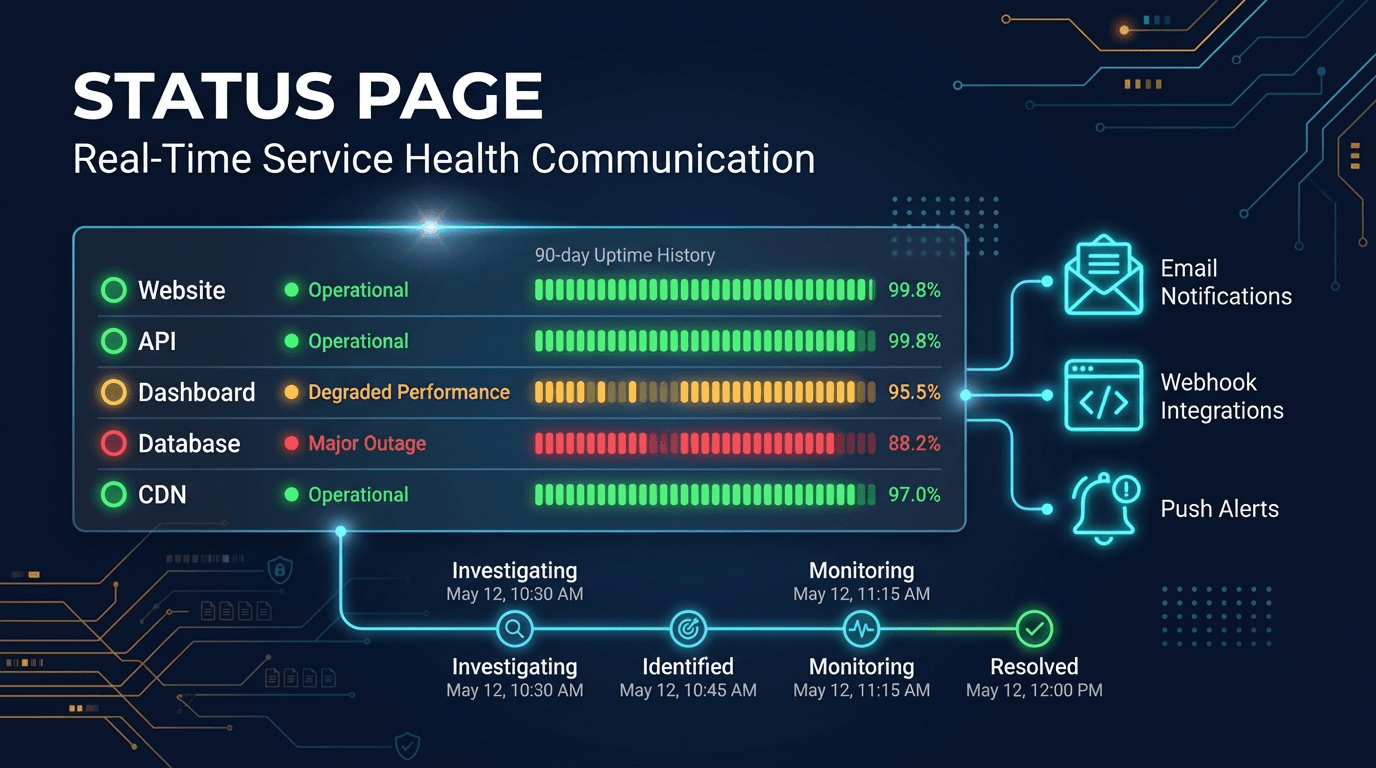
A status page is a public-facing dashboard that communicates the real-time operational health of your services to customers, partners, and internal stakeholders. Instead of waiting for users to report problems or flooding your support channels during an outage, a status page proactively shows what is working, what is degraded, and what is down — with timestamped incident updates that keep everyone informed throughout the resolution process.
Why Status Pages Matter
Outages Are Inevitable — Silence Is Not
Every service experiences downtime. The difference between companies that retain trust during incidents and those that lose it often comes down to communication. When users encounter a broken feature and find no public acknowledgment, they assume the worst: the company does not know, does not care, or is hiding the problem. A status page eliminates this uncertainty by providing a single, always-available source of truth.
Support Ticket Volume Drops Significantly
During incidents, support teams are overwhelmed with "Is it just me?" tickets. A visible, up-to-date status page answers that question before it is asked. Organizations that deploy status pages typically report 30-60% fewer support tickets during outages, freeing support teams to focus on resolution rather than repetitive responses.
Trust Is Built Through Transparency
A 90-day uptime history bar is one of the most powerful trust signals a SaaS company can display. Prospects evaluating your platform can verify your reliability track record before signing a contract. Existing customers can see that incidents are rare, acknowledged quickly, and resolved systematically. Transparency during incidents builds the kind of trust that marketing alone cannot create.
How Status Pages Work
Component-Based Architecture
A status page organizes your infrastructure into named components — Website, API, Dashboard, CDN, Database, Authentication — each with an independent status indicator. This granularity matters because users care about specific services, not abstract infrastructure. When your API is degraded but your dashboard is healthy, users of the dashboard should not panic, and API consumers should know exactly what is affected.
Status Levels
Each component displays one of several status levels that communicate severity at a glance:
- Operational — the component is functioning normally
- Degraded Performance — the component is working but slower or partially impaired
- Partial Outage — some functionality is unavailable
- Major Outage — the component is completely unavailable
- Under Maintenance — planned downtime is in progress
Automatic Status Detection
The most effective status pages are connected directly to monitoring systems. When UpScanX detects a failure through uptime, API, or ping monitoring, the corresponding component on your status page updates automatically — no manual intervention required. This eliminates the dangerous gap between when a problem is detected and when users are informed.
Manual Override Capability
Automatic detection handles the common cases, but engineering teams need the ability to manually set component status for nuanced situations. A deployment that causes brief errors, a third-party dependency issue, or a planned migration might require manual status adjustments with custom messaging that automated systems cannot generate.
Incident Management
Incident Lifecycle
Status pages track incidents through a structured lifecycle: Investigating → Identified → Monitoring → Resolved. Each transition is timestamped and can include detailed update messages. This structure gives users a clear mental model of where things stand and builds confidence that the team is making progress.
Timestamped Updates
During an incident, regular updates are critical. Users do not need to know every technical detail, but they need to know that the team is actively working on the problem. Updates like "We have identified the root cause and are deploying a fix" or "The fix has been deployed and we are monitoring for stability" communicate progress without revealing sensitive internal details.
Post-Incident Communication
After resolution, status pages support post-mortem-style summaries that explain what happened, why it happened, and what steps are being taken to prevent recurrence. This level of accountability strengthens customer relationships and demonstrates operational maturity.
Uptime History Visualization
90-Day Rolling History
The status page displays a 90-day rolling uptime history bar for each component. Each day is represented as a segment colored by that day's operational status — green for fully operational, yellow for degraded periods, red for outages. Users can hover over any day to see exact uptime percentages and incident details.
Why History Matters
Uptime history provides context that real-time status alone cannot. A component showing "Operational" right now tells you about this moment. A 90-day history of solid green bars tells you about the platform's reliability over time. For enterprise buyers, compliance teams, and technical evaluators, this historical data often matters more than any marketing claim.
Multi-Region Monitoring Display
Geographic Transparency
Status pages can display monitoring results from multiple geographic regions — EU West, US East, US West, and other locations where your users are concentrated. This transparency shows that your service is monitored globally and helps users understand whether an issue is localized to their region or affects all regions equally.
Region-Specific Status Badges
Each monitor on the status page can display badges indicating which regions are actively monitoring it. This gives users confidence that the status information reflects genuine, multi-perspective verification rather than a single-point check.
Subscriber Notifications
Email Subscriptions
Visitors can subscribe to your status page via email. When an incident is created, updated, or resolved, subscribers receive automatic notifications. This is especially valuable for API consumers and enterprise customers who need to know about service disruptions without manually checking the page.
Webhook Integration
For programmatic consumers, webhook subscriptions deliver status updates as structured HTTP payloads to any endpoint. Development teams can integrate status page events into their own monitoring dashboards, Slack channels, or incident management systems.
Scheduled Maintenance Notifications
When planned maintenance is scheduled, subscribers are notified in advance. This reduces surprise and gives dependent teams time to prepare. Scheduled maintenance displayed on the status page also prevents false alarm reports from users who encounter expected downtime.
Branding and Customization
Custom Logo and Colors
A status page should feel like an extension of your brand, not a third-party tool. UpScanX status pages support custom logos and brand colors so the page matches your visual identity. Users arriving from your marketing site, documentation, or application footer should experience a seamless transition.
Custom Domain Support
Status pages can be served from your own domain — status.yourdomain.com — via CNAME record. This reinforces brand ownership and makes the page easy to find. Full SSL support ensures the custom domain is served securely without additional configuration.
Best Practices
Link to Your Status Page From Key Locations
Add status page links to your application footer, documentation site, help center, and error pages. The easier it is for users to find the status page, the fewer support tickets they will create during incidents.
Update Incidents Frequently During Outages
Silence during an outage is worse than the outage itself. Even if there is no new information, a brief update like "Investigation is ongoing, no new findings yet" reassures users that the team is engaged.
Organize Components by User Impact
Group components by how users experience them — "Website," "API," "Mobile App," "Payments" — rather than by internal infrastructure names. Users should immediately understand which components affect the features they use.
Use Scheduled Maintenance Proactively
Announce maintenance windows at least 24 hours in advance. This builds trust and prevents confusion when the maintenance begins.
Review Uptime History Monthly
Use the 90-day history as an internal quality metric. If certain components show recurring degradation, investigate whether monitoring thresholds need adjustment, infrastructure needs scaling, or dependencies need improvement.
How UpScanX Delivers Status Pages
UpScanX status pages are directly connected to your monitoring checks — uptime, API, ping, SSL, domain, and port monitors all feed component status automatically. When a monitor detects a failure, the linked component updates in real time. When the monitor recovers, the component returns to operational status.
Each status page supports custom branding, custom domain via CNAME, component grouping, incident management with timestamped updates, 90-day uptime history bars, multi-region monitoring badges, and subscriber notifications via email and webhook. Status pages are included free with every UpScanX plan — no additional cost, no usage limits.
Combined with AI-powered reports, analytics dashboards, and comprehensive monitoring services, UpScanX provides end-to-end visibility from infrastructure health to user-facing status communication — all from a single platform.
Start communicating your service health transparently with UpScanX status pages — free with every plan.