


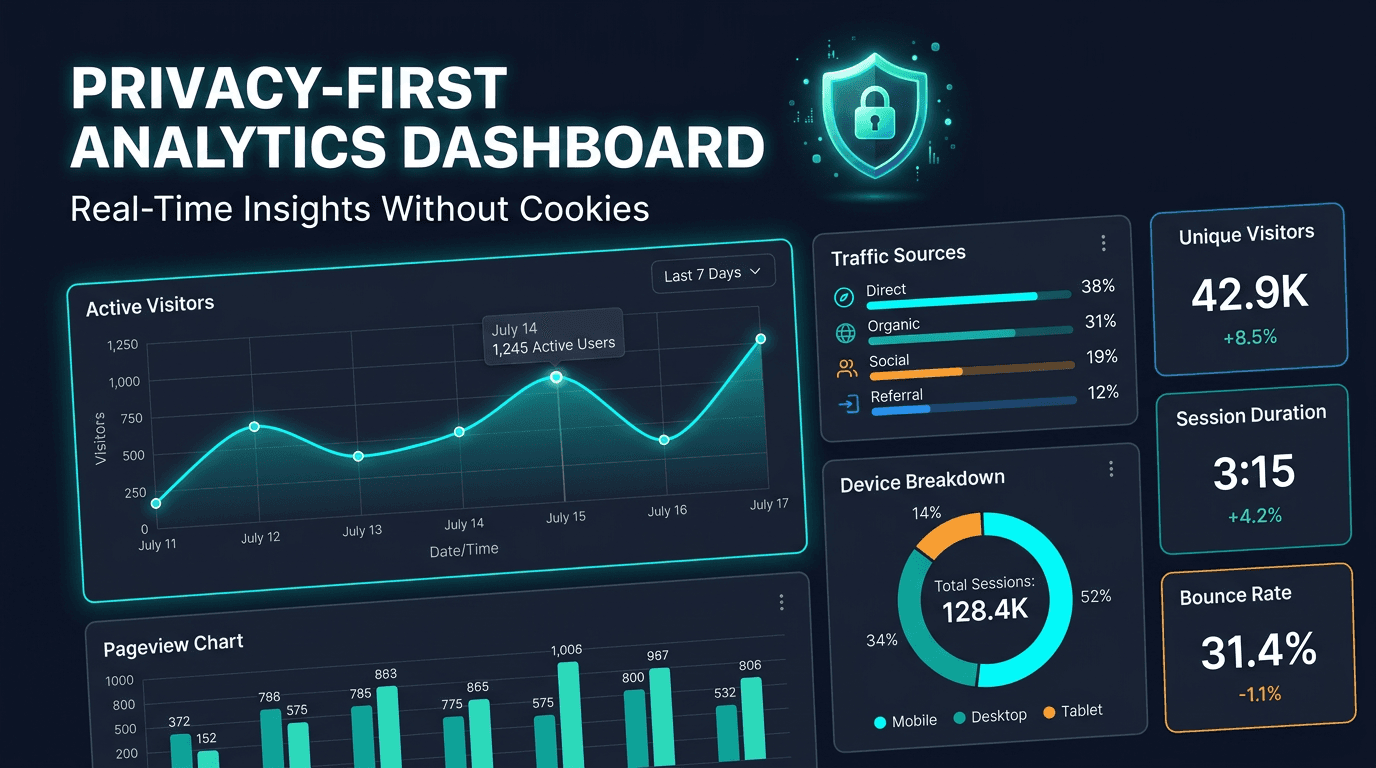
Website analytics is going through a major shift. For years, many teams relied on cookie-heavy platforms that produced useful reports but came with consent banners, compliance complexity, blocked scripts, incomplete data, and performance overhead. In 2026, privacy-first analytics dashboards are becoming a much more attractive option because they offer real-time visibility without the same trade-offs.
A privacy-first analytics dashboard is designed to show traffic, engagement, referrers, page performance, and technical behavior without relying on invasive tracking. That means no unnecessary cookies, less legal friction, better performance, and in many cases, more representative traffic coverage because visitors are not disappearing behind consent rejection flows. This guide explains why privacy-first analytics matters and what a strong modern dashboard should include.
Why Privacy-First Analytics Matters in 2026
Analytics quality has always depended on data coverage, but traditional cookie-based analytics now run into three major problems. First, many users reject consent banners, which means important traffic goes untracked. Second, privacy regulation continues to raise expectations around data minimization and consent. Third, many teams want analytics that do not slow down the site they are trying to measure.
Privacy-first analytics addresses all three issues. By avoiding unnecessary personal tracking and focusing on event-level or aggregated visibility, these tools often provide a cleaner operational model. Teams gain insight without creating as much legal or technical overhead. This is especially attractive for SaaS teams, content sites, agencies, and brands that want clarity without turning analytics into a compliance project.
What a Privacy-First Analytics Dashboard Should Show
A strong dashboard should still answer the questions every team cares about. How many visitors are arriving? Which pages matter most? Where is traffic coming from? Which devices dominate? Are response codes healthy? Are engagement patterns improving or degrading? Privacy-first does not mean less useful. It means more focused and less invasive.
The best dashboards surface this information in real time or near real time, with simple trends over the last day, week, and month. They should help operators, marketers, product teams, and founders understand what is happening right now without requiring a training course to interpret the interface.
Core Metric 1: Page Views and Unique Visitors
These are still foundational metrics. Page views tell you which content or routes are getting attention. Unique visitors help estimate audience breadth instead of just total activity volume. In privacy-first systems, this is usually done with short-lived, anonymized logic rather than long-lived personal tracking.
The value here is not just volume. Comparing page views to unique visitors shows whether traffic is broad or concentrated. This matters for content strategy, SEO analysis, product messaging, and campaign review. A good dashboard makes these metrics easy to understand without sacrificing privacy expectations.
Core Metric 2: Traffic Sources and Referrers
Traffic source analysis remains essential because it shows how people are finding your site. Organic, direct, referral, social, and campaign-based traffic all tell a different story. A privacy-first dashboard should show channel-level breakdowns and make it easy to identify which referrers actually drive useful traffic.
This is particularly important for SEO and content teams. If organic traffic is rising but referral traffic is dropping, the response may be very different from a situation where paid traffic is steady but direct traffic collapses. Traffic source clarity helps turn analytics into decisions instead of passive observation.
Core Metric 3: Top Pages and Landing Pages
You need to know which pages attract attention and which pages introduce visitors to the site. Top pages reveal content demand. Landing pages reveal acquisition performance. For SEO-driven sites, this helps identify which templates or topics are attracting organic visibility and where optimization efforts should be focused.
A useful dashboard should also show page trends over time. That makes it much easier to spot whether a page is climbing because of search growth, campaign success, or sudden referral volume. Without page-level movement over time, analytics quickly becomes too static to support strategy.
Core Metric 4: Device, Browser, and Platform Mix
Privacy-first analytics can still provide strong technical context. Device type, browser distribution, operating system mix, and screen category insights all help teams prioritize QA, design, and performance work. If most of your audience is on mobile Safari, that matters. If an enterprise product gets heavy desktop Chrome usage, that matters too.
This information becomes more actionable when it is tied to page performance or behavioral patterns. For example, if bounce rates are higher on a certain device family or browser, that may point to a rendering issue, UX mismatch, or speed problem. Technical analytics is one of the fastest ways to bridge product, engineering, and growth work.
Core Metric 5: Real-Time Activity
Real-time visibility is valuable because it helps teams understand what is happening now, not just what happened yesterday. Product launches, campaigns, newsletter sends, social posts, and incident response all benefit from real-time dashboards. If a page goes viral, if a campaign starts converting, or if traffic suddenly drops, the dashboard should show it clearly.
For operational teams, real-time visibility is especially useful when paired with monitoring data. If uptime remains healthy but active visitors suddenly collapse, something may be wrong in acquisition or page rendering. If traffic spikes at the same moment response codes worsen, that creates immediate investigation context.
Core Metric 6: Status Codes and Technical Signals
One of the biggest advantages of a monitoring-friendly analytics dashboard is visibility into technical behavior, not just marketing behavior. Status code tracking helps teams see how many visits hit 200, 301, 404, or 500 responses. That creates a direct bridge between traffic analysis and site health.
This is extremely helpful for SEO, migrations, and launch reviews. Rising 404 counts may reveal broken internal links or removed pages. Increased redirects may indicate structural changes. Server errors tied to active traffic help teams prioritize technical fixes by impact instead of by guesswork.
Why Privacy-First Analytics Helps SEO Teams
SEO teams need trustworthy landing-page visibility, not just raw traffic totals. A privacy-first analytics dashboard supports this by making it easier to see which pages attract organic sessions, how those pages behave over time, and whether engagement patterns look healthy. Because the tracking model is lighter and less dependent on consent flows, the resulting data is often more representative of actual traffic.
This also helps during content refreshes, migrations, and technical SEO investigations. When rankings shift or performance drops, teams can compare traffic, page behavior, referrers, and technical signals in one place. The result is faster diagnosis and more confidence in what changed.
How Privacy-First Analytics Improves Site Performance
Heavy analytics scripts can hurt the very experience they are trying to measure. Large third-party libraries, synchronous loading, and tag overload add weight, complexity, and page-level risk. Privacy-first tools tend to be much lighter, which improves site speed and reduces implementation friction.
That is valuable not only for Core Web Vitals but also for engineering simplicity. A smaller script surface means fewer performance surprises, fewer consent dependencies, and less risk that analytics itself becomes a reason pages slow down or behave inconsistently.
Common Mistakes to Avoid
One common mistake is expecting privacy-first analytics to behave exactly like legacy, identity-heavy tools. The goal is different. The focus is not invasive per-user tracking but meaningful, real-time, operationally useful website intelligence. Another mistake is looking only at top-level charts and ignoring page-level or technical signals that explain why metrics changed.
Teams also sometimes separate analytics too far from monitoring. If traffic, performance, uptime, and status codes are reviewed in different systems with no shared context, diagnosis gets slower. The best setups combine behavioral and technical visibility in a way that helps teams act faster.
What to Look for in a Privacy-First Analytics Dashboard
The best dashboards combine real-time traffic, source attribution, top pages, landing pages, device breakdowns, browser insights, status code reporting, and exportable visit data. It helps if the interface is fast, easy to scan, and built for teams who need answers quickly. Bonus points go to platforms that integrate analytics with uptime, domain, SSL, and API monitoring because that combination provides much stronger context.
You should also look for implementation simplicity. A good analytics dashboard should be easy to deploy, easy to trust, and easy to interpret. If setup is heavy or the interface is overly complex, teams are less likely to use the tool actively.
Privacy-first analytics dashboards are gaining traction in 2026 because they solve a real problem: teams want better visibility without sacrificing compliance, performance, or user trust. They provide practical insight into traffic, engagement, referrers, devices, and technical health while keeping the analytics footprint lighter and cleaner.
For many organizations, this is the future of website intelligence. Not because it sounds better in theory, but because it works better in practice. When analytics is simpler, faster, more privacy-aware, and easier to connect to monitoring data, teams make better decisions with less friction.