


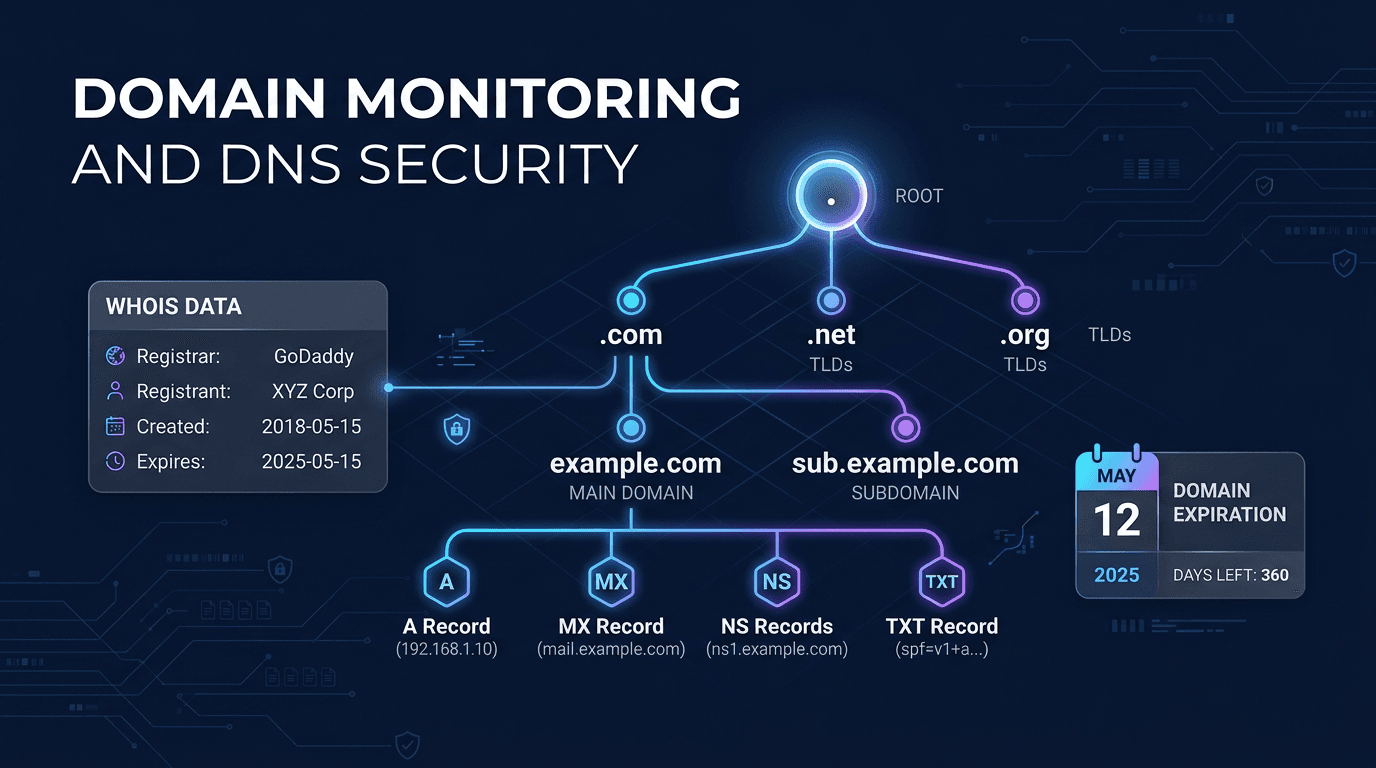
Domain monitoring is the continuous practice of tracking a domain's ownership, DNS configuration, and security posture to prevent outages, detect unauthorized changes, and stop hijacking attempts before they become incidents. A domain is the single most critical dependency for any online business — when DNS fails, everything fails, even if every server behind it is running perfectly. Proactive monitoring turns domain changes into structured, prioritized alerts so teams can respond before customers or search engines notice.
Why Domain Monitoring Matters
DNS Failures Break Everything
A DNS failure creates "everything is down" symptoms regardless of whether your actual infrastructure is healthy. If your A records point to the wrong IP, your MX records are deleted, or your nameservers change unexpectedly, web traffic, email delivery, and API integrations all stop working simultaneously. DNS monitoring detects these issues in 1-2 minutes compared to the 15-60 minutes it typically takes without monitoring.
Domain Expiration Is Still a Leading Outage Cause
Despite auto-renewal features, domain expiration remains a top cause of preventable outages. Billing failures, expired credit cards, registrar account lockouts, and organizational changes all cause domains to lapse. Once a domain expires, it enters a grace period and then becomes available for anyone to register — including competitors and domain squatters.
Email Deliverability Depends on DNS
MX, SPF, DKIM, and DMARC records directly control whether your email gets delivered or flagged as spam. A single unauthorized change to these records can silently break email delivery for your entire organization, and the effects may not be obvious for days.
What Domain Monitoring Tracks
WHOIS and RDAP Registration Data
Registration data includes the registrar, registrant contacts, creation date, expiration date, and status flags like clientTransferProhibited (domain lock). Monitoring captures changes to these fields, alerting when ownership information, registrar, or lock status changes unexpectedly.
DNS Record Snapshots
The monitoring system takes periodic snapshots of all DNS record types — A, AAAA, CNAME, MX, TXT, NS, and SRV — from multiple resolvers and regions. A diff engine compares each snapshot to the previous baseline and classifies differences by impact severity.
Nameserver Configuration
Nameservers are the gatekeepers of your zone. An unexpected NS change should be treated as a potential hijack until proven otherwise. Monitoring validates NS records at both the parent registry and the zone apex, catching mismatches that cause intermittent resolution failures.
DNSSEC Validation
DNSSEC authenticates DNS data using cryptographic signatures. Monitoring confirms that DS records exist at the parent, algorithms are current, and RRSIG signatures remain valid. DNSSEC deployment has reached 55% for .com domains in 2026, making it an increasingly important monitoring target.
Best Practices for Domain Monitoring
Set Up Tiered Expiration Alerts
Use a graduated alert schedule: 60, 30, 14, 7, 3, and 1 day(s) before expiration, with escalation if no acknowledgement occurs. Even with auto-renewal enabled, these alerts serve as a safety net against billing failures and account issues.
Monitor DNS From Multiple Regions and Resolvers
DNS answers can differ by region due to propagation delays, GeoDNS configurations, or cache poisoning. Query from at least 3 geographic locations using both your own resolvers and public resolvers (Google DNS, Cloudflare) to detect inconsistencies.
Classify DNS Changes by Impact
Not all DNS changes are emergencies. CDNs rotate edge IPs, and TXT records change during service provider verifications. Build a rules engine that suppresses routine, expected changes while escalating anomalies like NS replacement, MX deletion, or SPF/DKIM modification outside of maintenance windows.
Lock Domains and Enable MFA
Keep domains locked (clientTransferProhibited) by default and enable multi-factor authentication on registrar accounts. Monitor for unexpected lock status changes — a domain transitioning from locked to unlocked outside a planned window is a high-urgency signal.
Correlate Multiple Signals
A single DNS change might be routine. But an NS change combined with a WHOIS contact change and a domain unlock occurring simultaneously is a strong hijacking signal. Configure alerts that escalate when two or more high-risk indicators appear together.
Common DNS Problems to Watch For
Resolution Failures
NXDOMAIN, SERVFAIL, and REFUSED responses indicate that a domain cannot be resolved at all. These can be caused by expired domains, deleted zones, or nameserver misconfigurations.
Propagation Inconsistencies
Different DNS resolvers returning different answers for the same query indicate incomplete propagation, stale caches, or split-horizon DNS issues. Multi-region monitoring catches these before they affect users in specific geographies.
Record Drift
Gradual, unplanned changes to DNS records over time — often caused by automation bugs, manual edits without documentation, or provider-side modifications — create a gap between your intended configuration and reality.
DNSSEC Signature Expiration
DNSSEC RRSIG records have expiration dates that require renewal. If signatures expire or key rollovers fail, the domain becomes completely inaccessible to DNSSEC-validating resolvers.
Use Cases
Multi-Domain Organizations
Companies managing portfolios of dozens or hundreds of domains need centralized visibility into expiration dates, DNS configurations, and lock status across every domain. Monitoring prevents the "forgotten domain" problem where an unused but important domain expires.
Digital Marketing Agencies
Agencies managing client domains bear responsibility for domain continuity. Monitoring provides the audit trail and early warning system needed to protect client assets and maintain trust.
E-Commerce and SaaS Companies
Revenue-generating domains require the highest monitoring priority. DNS failures during peak traffic or during marketing campaigns multiply the financial impact of every minute of downtime.
Security-Conscious Organizations
Domain hijacking is a real attack vector used for phishing, credential theft, and brand impersonation. DNS monitoring combined with WHOIS change detection provides the earliest possible warning of compromise attempts.
How UpScanX Handles Domain Monitoring
UpScanX monitors domain expiration dates, DNS records, nameserver configurations, and WHOIS registration data continuously. The platform sends tiered expiration alerts and instantly notifies teams when DNS records change, nameservers are modified, or domain lock status is altered.
Multi-region DNS checking from 15+ global locations detects propagation issues and geographic inconsistencies. The dashboard shows a complete history of every DNS change with diff views that make it easy to identify what changed, when, and whether it was expected. Combined with SSL monitoring and uptime tracking, UpScanX provides comprehensive domain protection from a single platform.
Domain Monitoring Checklist
Teams that manage even a small domain portfolio should keep a written checklist. Every critical domain should have auto-renew enabled, a registrar lock enabled, multi-factor authentication on the registrar account, and at least one secondary owner who can access billing and support. Monitoring should cover A, AAAA, MX, TXT, NS, and any DNSSEC-related records that influence trust and deliverability.
It is also smart to define a change policy. If nameservers change, who approves it? If MX records disappear, who restores them? If the registrar contact changes, who verifies it out of band? These details matter because domain incidents often become business incidents within minutes. Good monitoring does not just tell you that a change happened. It gives you enough context to act immediately and safely.
For SEO-focused teams, domain monitoring also protects search visibility. Wrong DNS answers, long propagation issues, or domain expiration events can make key landing pages unreachable to crawlers exactly when rankings matter most. That makes domain monitoring both an infrastructure control and a growth protection tool.
In practice, the best programs review domain health weekly, not just when an alert fires. That habit prevents small configuration drift from becoming a public outage.
Start protecting your domains with UpScanX — free monitoring available today.